
I’m excited to share my journey with Data Career Jumpstart as I dive into the second module, focused on mastering data analysis with Microsoft Excel. This hands-on experience is a fantastic opportunity to develop my analytical skills through exploration and reporting.
Project Snapshot
Role: Data Analyst
Goal: Understand how customers behave and explore the differences between those who responded to previous marketing campaigns and those who didn’t
Key Insight:
- Participants in the campaign generally have higher incomes, with 57% earning $60,000 or more, leading to more purchases
- Families with children are more often found among those who didn’t join the campaign, particularly those with younger kids
- The biggest differences in purchases are seen in wine and regular-priced products
- The number of catalog purchases is noticeably higher among customers in the accepted campaign
- Those who accepted the campaign bought more with deals and filed fewer complaints
Case Study & Problem Overview
In this case study, I’m acting as a Data Analyst for a food delivery service. My main aim is to understand how customers behave and explore the differences between those who responded to previous marketing campaigns and those who didn’t. By discovering these insights, I can help the company improve its strategy. The information I gather will yield practical suggestions to guide marketing efforts and business decisions.
- Understand the key data elements.
- Identify valuable business insights and opportunities.
- Propose data-driven strategies that will improve the effectiveness of marketing campaigns and create real value.
Analytical Process & Methodology
This section explains how I analyzed the data. I used Excel to clean and organize the data, explore it, and create visual displays. My first step was to understand the data better. Then I looked into how the behaviors of customers who accepted the marketing campaigns differed from those who didn’t.
Getting to Know the Data
The dataset used in this project reflects food-delivery operations. It has been adapted and further modified for instructional purposes. The provided data is an Excel file containing 2,205 entries of customer information, featuring 36 attributes, including the following:
- Customer’s yearly income
- Total amount spent at the store by each customer
- Number of young kids and teenagers in the home
- Number of days since the last purchase
- Amount spent on various types of products, such as wine, fruit, meat, fish, sweets, gold products, and regular products
- Number of purchases with deals
- Number of purchases made through different shopping channels, including the website, catalogues, and physical stores
- Number of visits to the website in the last month
- Whether the customer accepted offers in the first to sixth campaigns
- Customer complaints in the last two years
- Age of the customer
- Number of days since the customer first joined and the date joined
- Marital status
- Education level
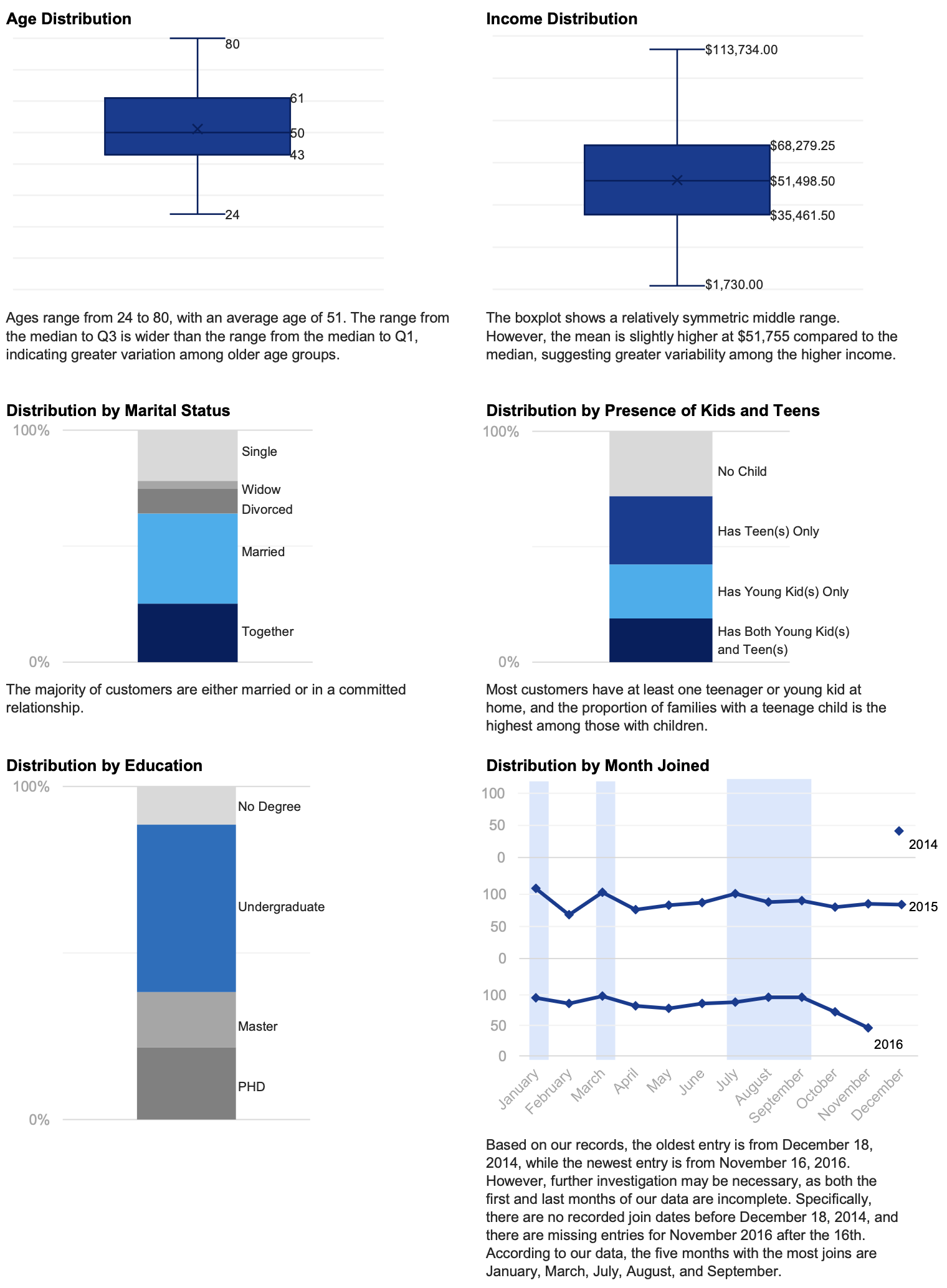
Of the 2,205 records I received, I used Excel’s built-in duplicate-checking feature to identify 184 duplicates, leaving 2,021 clean records. Upon reviewing the data in each column, I discovered that 3 rows had purchase amounts for regular products that were negative. I considered these figures anomalies, since customers in these 3 rows had not participated in any campaigns or deals that could have reduced their purchase amounts. Consequently, I decided to remove these rows, reducing the total number of records to 2,018. I then conducted an initial analysis of customer backgrounds and join dates, which is illustrated in the visualizations below.
Campaign Response Analysis
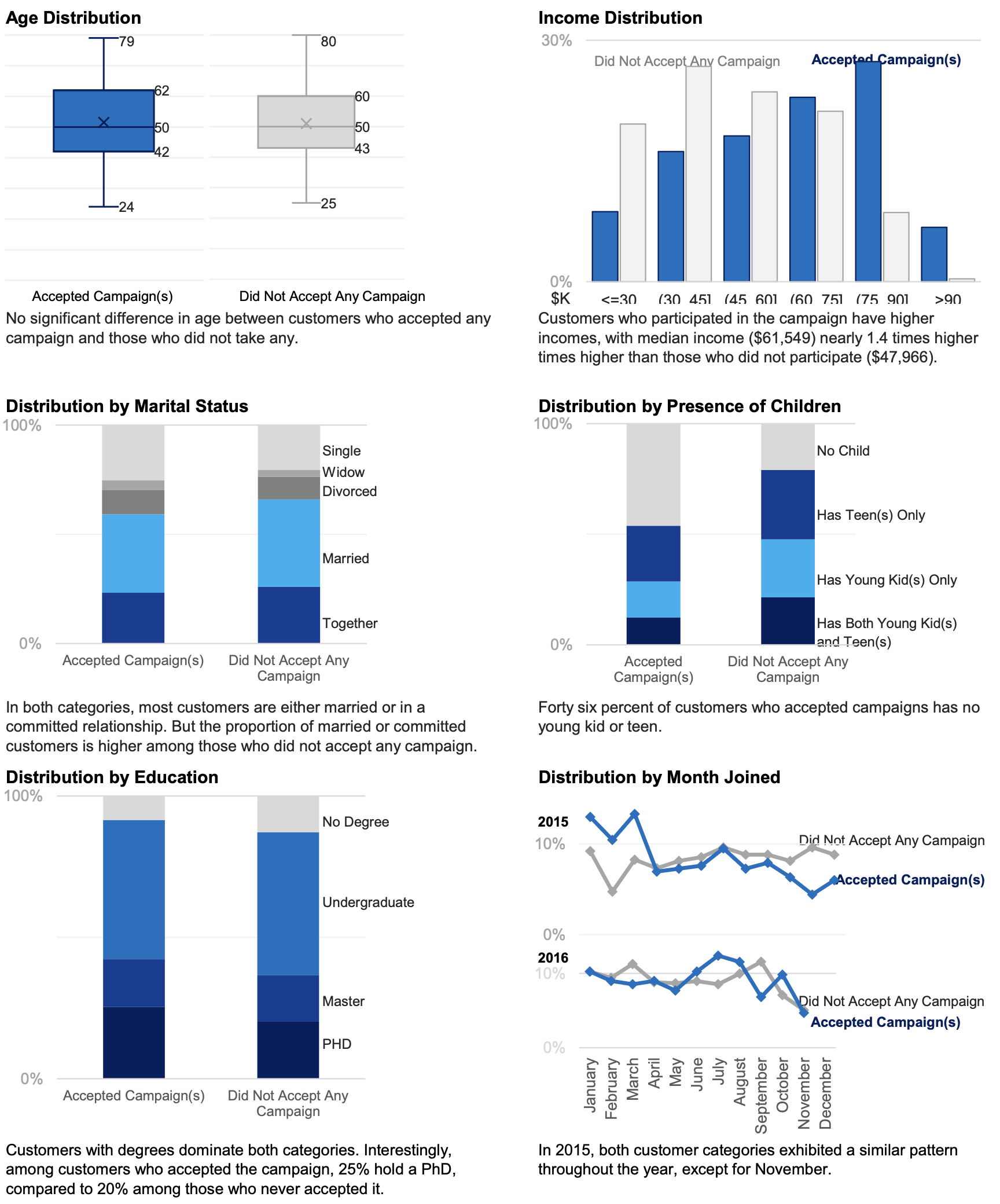
I’m comparing two categories to understand their behaviors. Customers who accepted any campaigns accounted for 28% of the records, while those who did not accounted for 72%. Although the two groups differ in size, our focus is on the patterns within each group. The difference in record counts does not impact the insights I can gain. The distribution of customer behavior by background and join date is shown in the visualizations below.
I then compared the two groups to identify differences in their shopping behaviors.
Compare Shopping Habits
Insights from Campaign Response Analysis
- Two key factors that differentiate customers who accepted the campaign from those who did not are income and the presence of children:
- Income: Customers who participated in the campaign tend to have significantly higher incomes. Specifically, 57% of those who accepted the campaign earn $60,000 or more. Also, income has a stronger effect on total purchases among customers participating in the accepted campaign.
- Presence of children: Generally, households with children are much more prevalent in the group that did not accept the campaign. This trend is consistent across all age groups of children, including young kid, teens, and mixed-age groups. The group that accepted the campaign has fewer households with children in each category, particularly among those with young kids.
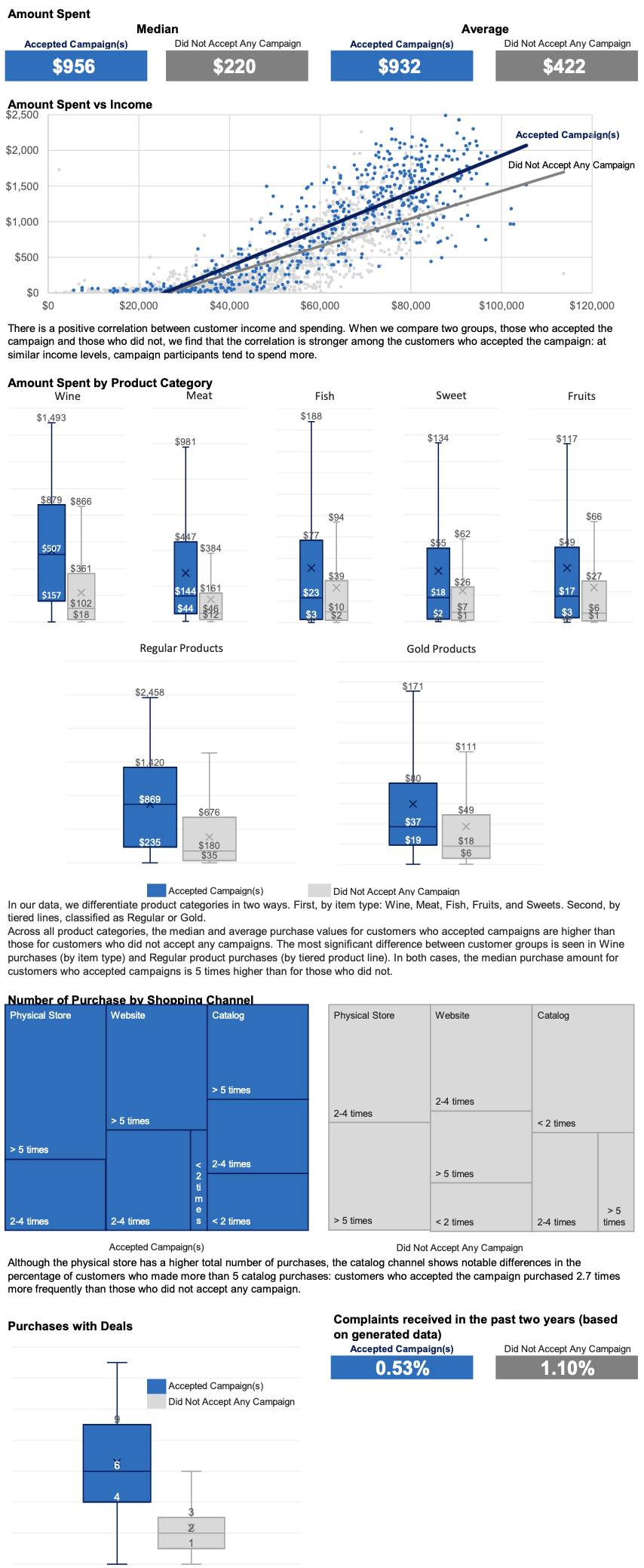
- The product with the most significant purchase difference between customers who accepted the campaign and those who did not is: wine (by item) and regular-tier products (by tiered product line).
However, I only have data on the total amount spent on these products and do not have information on the quantity sold or their respective prices. Therefore, despite observing a notable amount spent on wine and regular-tier products among customers who accepted the campaign, I will not include these product categories in our recommendations. - The number of catalog purchases is noticeably higher among customers in the accepted campaign.
- Customers who accepted the campaigns made more frequent purchases with the deals and filed fewer complaints.
Strategic Recommendations & Action Plan
This section offers some suggestions based on what I learned from the case study. It’s important to be careful with these suggestions because the data only shows relationships, not clear causes. For example, I don’t know if past marketing campaigns successfully reached the right people. I also don’t have details on when the six campaigns took place or how customer spending changed after each one.
Based on the information available, here are my key recommendations:
- The next marketing campaign should target customers with higher incomes, specifically those making over $60,000 a year,
- We should focus on customers who do not have children,
- We should reach out to people who use our catalog,
- It would be effective to run campaigns that offer special deals.
To improve our understanding of customer behavior, I also suggest some follow-up steps to analyze the data more effectively in the future. These steps include:
- Looking at how customers behaved after each past campaign to see what worked well,
- Gathering more specific information about how many products people bought, since we currently only have information on how much money they spent,
- Keeping track of when each campaign took place to see how it affected the number of purchases and spending,
- Accessing the criteria used for each campaign’s target audience to gain deeper insights.
By following these recommendations and follow-up action plans, a focused approach can be established to enhance strategies through continuous improvement.

What came next?
In the third module of the Data Analytics Accelerator program, I designed a one-page infographic highlighting the Massachusetts education system in 2017. This visual representation, created in Tableau, makes the information easier to understand and presents key facts clearly and engagingly.